WP Mail SMTP Gmail 535 error: how to fix it
By JY.Choi
WP Mail SMTP’s 535-5.7.8 “Username and Password not accepted” error means Gmail rejected the login itself, not the connection — and on a nichestead.com test send, the fix was generating a Google app password and using that instead of the account password (Google Account Help).
Quick answer
- A 535 error is an authentication failure. The connection to Gmail’s mail server worked; the username or password didn’t.
- Gmail app accounts with 2-Step Verification need a 16-digit app password for SMTP logins, not the regular sign-in password (Google Account Help).
- Changing your Google Account password revokes every existing app password, so WP Mail SMTP needs a fresh one after that (Google Account Help).
- WP Mail SMTP’s own docs list a recently changed password, a mistyped username, or a mistyped password/API key as the causes of this exact error (WP Mail SMTP docs).
In this guide
- What the 535 error means
- Why a normal Gmail password stopped working
- The fix: use a Google app password
- How to configure WP Mail SMTP with Gmail (the other mailer option)
- Common problems
- Bottom line
What the 535 error means
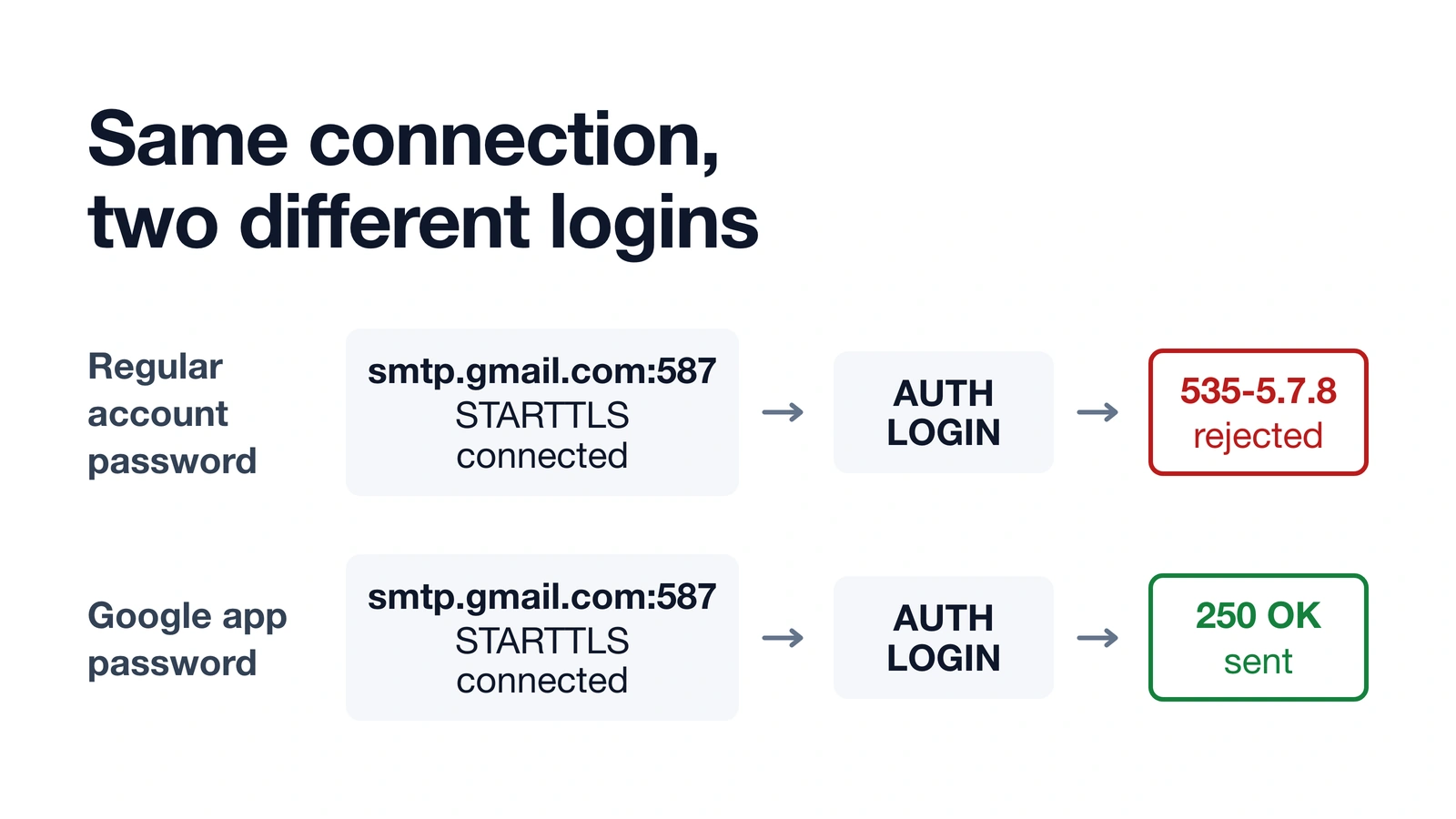
A 535 SMTP error means Gmail’s server accepted the connection but rejected the login credentials. On nichestead.com, WP Mail SMTP was set to the “Other SMTP” mailer with host smtp.gmail.com, port 587, and TLS encryption, and the TCP connection plus STARTTLS handshake to smtp.gmail.com:587 succeeded — the send still failed with 535-5.7.8 Username and Password not accepted (wordpress-setup.md). That distinction matters: a 535 error isn’t a firewall, port, or DNS problem. It’s Gmail specifically saying the username or password it received is wrong.
WP Mail SMTP’s own documentation lists three likely causes for this exact error: a recently changed account password, a mistyped username, or a mistyped password or API key (WP Mail SMTP docs).

Why a normal Gmail password stopped working
Google app passwords exist because Gmail treats SMTP logins from a plugin like WP Mail SMTP as a “less secure” sign-in method, and that method needs a 16-digit app password instead of your regular account password. App passwords only work on accounts that already have 2-Step Verification turned on (Google Account Help).
Google has published more than one date for when it stopped accepting plain account passwords for this kind of sign-in: a Google Workspace Updates post says September 30, 2024, a Google Account Help page says January 2025, and the same blog post’s own later revision says May 1, 2025. The exact date isn’t settled across Google’s own pages, so treat it as a change that phased in through 2024 and 2025 rather than a single cutoff — the practical takeaway is the same either way: an app password is what Gmail expects now.
Google also revokes every existing app password automatically the moment the Google Account password is changed, which is a common reason a working SMTP connection suddenly starts throwing 535 errors after a password reset (Google Account Help).
The fix: use a Google app password
This is the sequence that fixed the 535 error on nichestead.com.
- In your Google Account, generate a new app password. It has to be for an account with 2-Step Verification already turned on (Google Account Help).
- In wp-admin, go to WP Mail SMTP > Settings. Confirm the mailer is set to “Other SMTP,” the SMTP host is
smtp.gmail.com, the port is 587, and encryption is set to TLS.

- Replace the SMTP Password field with the new app password, not the regular Google Account password.
- Send a test email from WP Mail SMTP > Email Test. After this change on nichestead.com, the retest returned “Test email sent successfully!” (
wordpress-setup.md).

If the test still fails, double-check the app password was copied without spaces and that the SMTP username field holds the full Gmail address, not just the account name.
How to configure WP Mail SMTP with Gmail (the other mailer option)
WP Mail SMTP actually offers two different ways to connect to Gmail, and it’s worth knowing which one you’re on. The “Other SMTP” mailer — the one this post covers — logs in with a plain SMTP username and password (an app password, per the fix above). WP Mail SMTP’s separate Gmail mailer setup instead requires creating a Google Cloud project, enabling the Gmail API, and configuring a set of OAuth 2.0 credentials; that path never touches a plain username or password field at all (WP Mail SMTP docs). If you’re set up on the Gmail mailer instead of “Other SMTP,” a 535 username/password error shouldn’t be the failure mode you’re chasing — check your OAuth credentials instead.
Common problems
The test email suddenly fails after weeks of working fine. Check whether the Google Account password was changed recently. Google revokes app passwords automatically on a password change, so WP Mail SMTP needs a freshly generated one (Google Account Help).
The error mentions the username, not just the password. Confirm the SMTP username field has the full Gmail address (name@gmail.com), not a shortened version.
2-Step Verification isn’t turned on yet. App passwords aren’t available until 2-Step Verification is enabled on the Google Account (Google Account Help).
Bottom line
A 535-5.7.8 error from Gmail through WP Mail SMTP is a login rejection, not a connection problem, and in this case the fix was a fresh Google app password in place of the account password. If a working setup breaks later, check the app password first — a Google password change quietly revokes it.
LiteSpeed Purge All not clearing a deleted plugin’s leftover script
how to start a blog
How AI was used: Claude researched this post, wrote it, and made all three diagrams, including recreations of nichestead.com admin screens, then checked each claim against the linked WP Mail SMTP and Google documentation. JY.Choi, the site’s owner, set the editorial rules; no person reviews posts before they go live.