WordPress vs Squarespace for a beginner blog
By JY.Choi
For a beginner, blog-first site — not a business or e-commerce site — the real difference between WordPress and Squarespace isn’t which one looks nicer out of the box; it’s that WordPress separates hosting from software and gives you a native, portable export, while Squarespace bundles everything into one subscription with limited or no export depending on which version of the platform you’re on.
This comparison is based on each platform’s own official documentation, not hands-on use of either one.
Key takeaways
- Squarespace 7.1 sites cannot use the XML export feature at all; only Squarespace 7.0 sites can export, and even then only one blog page’s posts (up to 1,000 comments per post) come with it — most other content and page types are excluded (Squarespace Help Center).
- Squarespace’s own Help Center states it is “not possible to export content from one Squarespace site and import it into another” (Squarespace Help Center).
- WordPress is free, open-source software under the GPLv2 license that you can run on hosting of your choice, so your content isn’t tied to one company’s export tool (WordPress.org).
- Squarespace’s own pricing page lists four plan tiers with up to 36% savings for paying annually and a 14-day free trial, but check Squarespace’s official pricing page directly for current numbers, since exact prices weren’t independently verifiable while researching this post.
In this guide
- Who this comparison is for
- Getting a blog online: what each platform requires
- Exporting your content later
- Pricing: check the source directly
- Choose WordPress if…
- Choose Squarespace if…
- Bottom line
Who this comparison is for
This comparison is scoped to a beginner starting a personal or hobby blog, not a business or online store. Squarespace and WordPress both offer commerce features, agency-level customization, and business tools that fall outside that scope and aren’t covered here.
Getting a blog online: what each platform requires
WordPress — meaning the free, self-hosted wordpress.org software this comparison covers — is open-source software licensed under the GPLv2 or later, which grants the right to run, study, modify, and redistribute it, but running it means choosing and paying for your own web hosting separately, plus a domain name (WordPress.org). Squarespace, by contrast, bundles software, hosting, and a subscription into one plan you sign up for directly through Squarespace, with no separate hosting decision to make. That’s the core structural difference: one extra decision (hosting) with more control, versus one bundled decision with less to configure.
Exporting your content later
If you ever want to move your content elsewhere, the two platforms are not equivalent. Squarespace’s own Help Center states that Squarespace 7.1 sites — the version Squarespace sells to new customers — cannot use the XML export feature at all; only sites still on the older Squarespace 7.0 can export, and even that export is limited to “Layout pages, one blog page, including all of its posts and up to 1,000 comments per post, text blocks, image blocks,” while excluding album, cover, index, info, calendar, portfolio, and store pages, page-specific headers, footers, and sidebars, additional blog pages, dropdowns, audio/product/video blocks, drafts, style settings, and custom CSS (Squarespace Help Center). The same article states directly that it’s “not possible to export content from one Squarespace site and import it into another” (Squarespace Help Center).
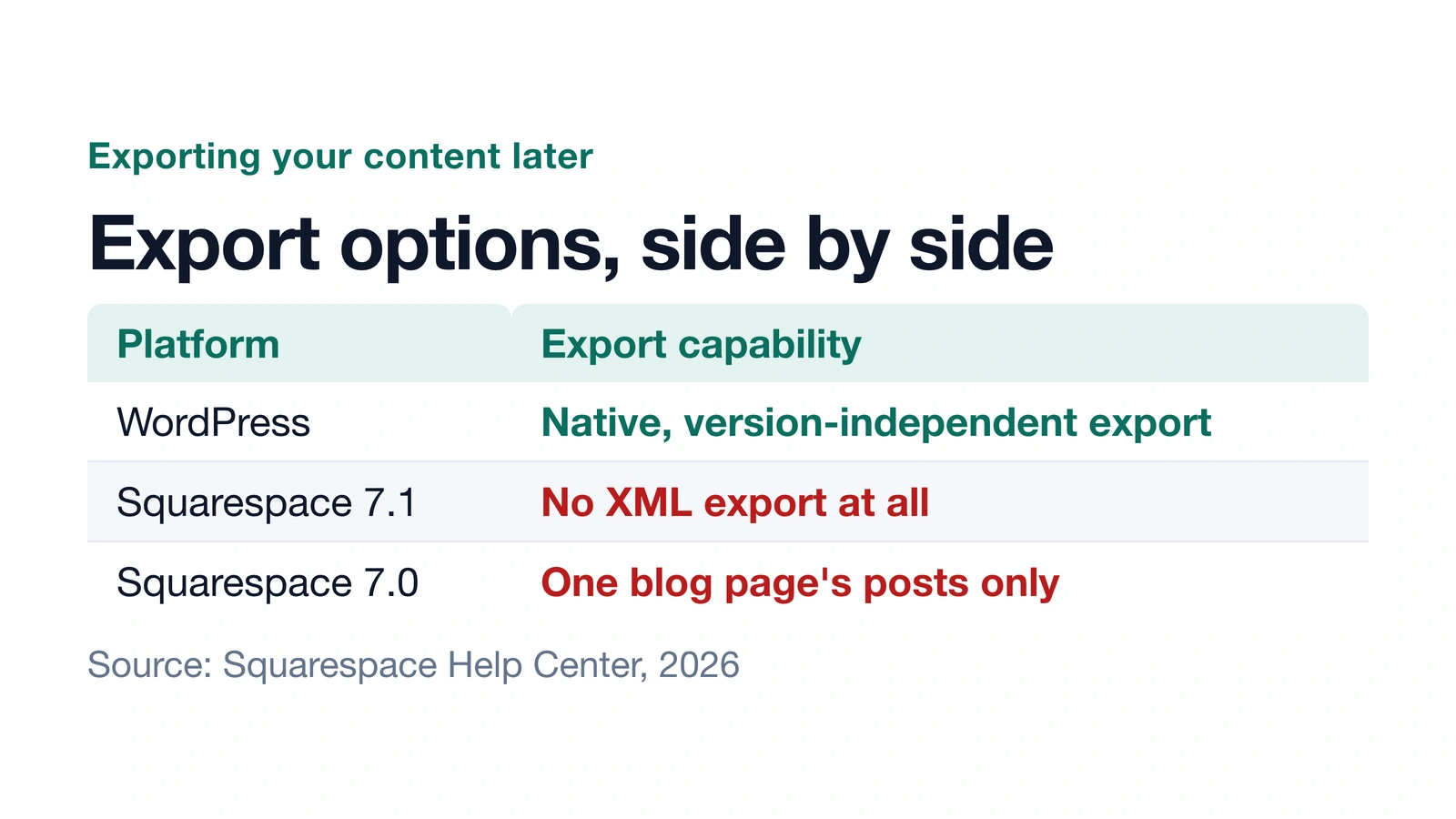
Self-hosted WordPress content is portable by design — your posts and media live in a database and file structure you control, independent of any single company’s export tool. That’s the direct opposite of Squarespace’s current 7.1 export situation.
Pricing: check the source directly
Squarespace’s own pricing page lists four plan tiers, describes a “Pay annually to save up to 36%” option, and offers a 14-day free trial, but its exact per-plan dollar prices couldn’t be independently confirmed while researching this post (Squarespace pricing). Rather than repeat a number that might be out of date by the time you read this, check Squarespace’s own pricing page directly for current figures before you decide. On the WordPress side, the software itself is free, but budget separately for hosting, a domain, and any premium theme or plugins you choose. Hosting renewal price: what “renews at” means and how to check it before you buy explains one part of that WordPress-side cost that’s easy to underestimate.
Choose WordPress if…
Choose WordPress if you want your content to stay portable regardless of which host or company you use later, and you’re willing to pick your own hosting as a separate step. Is WordPress still worth it in 2026? covers the tradeoffs of that choice in more depth, including WordPress’s own recent market-share numbers.
Choose Squarespace if…
Choose Squarespace if you’d rather have hosting and software bundled into one subscription with no separate hosting decision to make, and portability to another platform later isn’t a priority for the way you plan to use the site.
Bottom line
Neither platform is the overall winner for every beginner blog — the two are built around a different tradeoff. WordPress separates hosting from software and keeps your content portable; Squarespace bundles everything into one subscription with limited or no export, depending on version. Match that tradeoff to what matters more for your own blog, and confirm Squarespace’s current pricing directly on its own pricing page before you commit either way.
How AI was used: Claude researched this post using WordPress.org’s and Squarespace’s own official documentation and pricing pages, wrote it, and made one diagram. JY.Choi, the site’s owner, set the editorial rules; no person reviews posts before they go live. This comparison is based on official documentation from both platforms, not hands-on use of either one.